Threat coverage

A full SOC behind every new threat.

When a new campaign is disclosed, you shouldn’t have to wonder whether you’re covered, or whether it already happened.

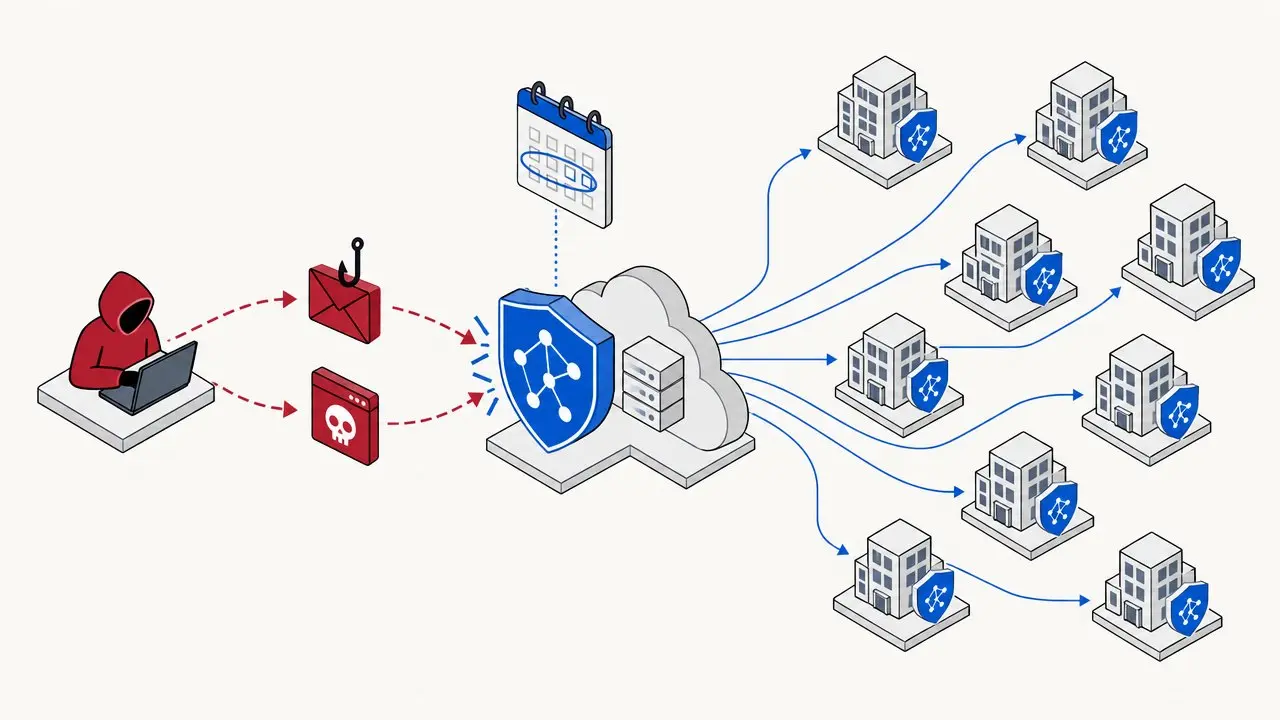
Ingext takes the threat apart, searches your systems for it, puts detection in place, and keeps getting sharper every time it sees a piece of it.

A new attack campaign stopped by one shield that then protects every customer

Left of boom · Right of boom

Most tools see the middle. Ingext sees the whole attack.

A detection is the moment something fires. Ingext works outward from it: root-cause analysis to the left, how they got in, and post-cause analysis to the right, what they did next.

That maps every telltale the attack leaves. So if one signal is missing, the rest of the pattern still gives it away, and the missing piece shows up as a gap you can close while you’re still in operations.

← Left of boom · root cause

Boom

Right of boom · what came next →

  1. ✓Phishing email lands
  2. ?Fake sign-in page relays MFALog missing · gap found
  3. ✓Session cookie captured
  4. !Stolen session replayedWhere most tools start and stop
  5. ✓Directory searched for payroll and finance staff
  6. ✓Inbox rule hides replies
  7. ✓Payment details changed
Telltale seenTelltale missing, attack still caught by the restExample: session theft (Storm-2755).

Not a threat feed. A SOC.

From a new threat to coverage, and better after that.

  1. 01

    Analyze the campaign

    The AI takes the attack apart: every step, and the record each step leaves behind. This takes minutes, not a research cycle.

  2. 02

    Search your systems

    It hunts your history for the same pattern, so you learn whether it already happened to you, not just whether it could.

  3. 03

    Detect

    A full range of detections goes in place for the whole attack, on every customer, with nothing for you to configure.

  4. 04

    Enhance

    Each time it catches a piece of the attack, it sharpens the signatures, the reporting and the path to closure.

Step 4 is the difference. Detection is where most tools stop; here it is where the loop starts paying off. How the loop matures →

What we’re covering now

What the attacker does. What Ingext catches.

Oct 2026 · Session theft

Storm-2755

What happens: An employee signs in through a fake page that relays to the real one. The attacker walks away with a live session, MFA already done.

What Ingext catches: The relayed sign-in, the replayed session the next day, and the mailbox activity that follows.

Oct 2026 · Device-code phishing

Storm-2372

What happens: An employee types a code on a genuine Microsoft page. No password is stolen, so nothing looks wrong.

What Ingext catches: The token approved on the real page and then used from somewhere else.

Oct 2026 · Tenant takeover

Storm-3119

What happens: A stolen admin account creates an app with tenant-wide rights. The app then runs your tenant with no one signing in.

What Ingext catches: One rogue app, followed from its permissions to its secrets to the password resets it performs.

Oct 2026 · Vendor app compromise

Storm-0940

What happens: A trusted vendor’s app is compromised and starts granting itself admin roles inside your tenant.

What Ingext catches: A vendor app handing out privileged access or planting secrets on other apps.

Oct 2026 · Social engineering

Teams helpdesk impersonation

What happens: “IT support” messages an employee on Teams, then calls and talks them into installing remote-access software.

What Ingext catches: The Teams chat from a throwaway outside tenant seconds before the call, and the installer from a throwaway host.

Oct 2026 · Credential attacks

MFA fatigue and password spraying

What happens: Push prompts until someone taps approve, or passwords tried across many accounts until one works.

What Ingext catches: Push bombing, MFA fraud reports, brute force, and the correct password arriving after blocked attempts.

Since 2021 · Email fraud

Business email compromise

What happens: An attacker inside a mailbox hides the replies and quietly redirects payments.

What Ingext catches: Forwarding, delegation, Send As, hidden inbox rules and risky app consents.

Full attack coverage, with ATT&CK mapping, in the manual →

Why it catches what others miss

You get the attack, not a pile of alerts.

01

It follows the whole attack.

One log line rarely proves anything. Ingext follows a session, a user or an app across sign-in and audit records for hours or days, and raises the case only when the full pattern appears.

02

Every alert is triaged for you.

AI triages every behavior alert. Ones that need no action are closed with the reason written down; every escalated case arrives with an investigation report attached.

03

One attack, one case.

Patented risk scoring groups related behavior by user or entity, so you see one prioritized case instead of five separate alerts.

See it in your environment

Connect Microsoft 365. Coverage starts flowing.

Identity coverage needs your Entra ID sign-in and audit logs and the Microsoft 365 audit log. Once that data is flowing, every new detection reaches you automatically.